 SmartReceiving
Check every delivery. Catch every short.
Snap the invoice, scan what came off the truck, and SmartReceiving shows you what's missing, before the driver leaves.
For iPhone · 14-day free trial · No card needed to start
What it does
Stop paying for products you never got
Shorts, wrong items and forgotten credits add up fast. SmartReceiving checks every line for you, so nothing slips through.
Reads the invoice for you
Take a photo and AI pulls out every item, quantity and price, even from faded, handwritten, multi-page or Spanish invoices.
Scan to count
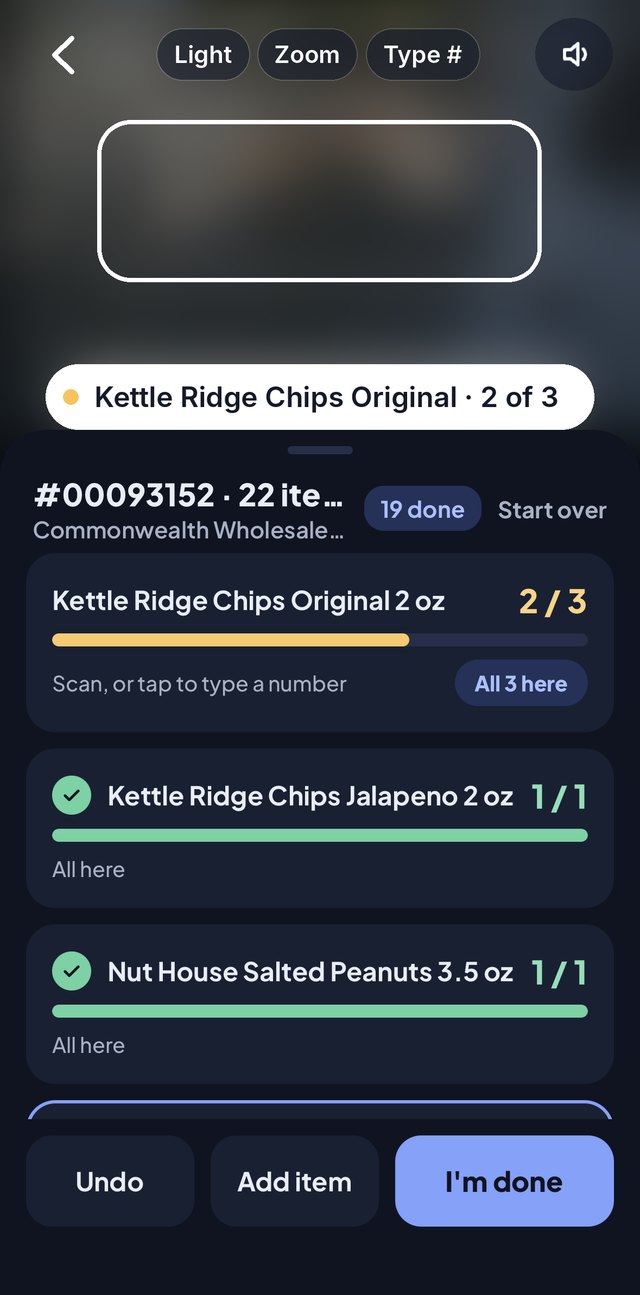
Scan each case as it comes in. The app ticks it off the invoice and beeps, and it learns new barcodes as you go.
Catches shorts on the spot
See what's missing before the driver leaves. Take a photo, get a signature, and keep proof for your credit.
Flags price increases
When a vendor raises a price, you'll know right away, with the old price next to the new one.
Tracks credits and returns
Credit memos, returns and deposits are kept apart from purchases, so your spending numbers stay honest.
Built for your whole team
Owners, managers and staff each get the right access. Everyone sees the same deliveries, live.
Photo proof before you finish
Every delivery needs 2 photos before it can be finished, like the full delivery and the signed invoice. Saved photos can't be deleted.
Driver signs for shorts
When something's missing, the driver signs right on your phone, so no one can say they delivered it.
Claim report in one tap
Get a PDF with the shorts, photos and signature, ready to email or text to your vendor for a credit.
Count from a photo
In a rush? Take photos of the delivery and AI counts the cases. Anything it isn't sure about is left for you to check.
Keeps working with weak signal
Back rooms and coolers often have no signal. Keep scanning: counts are saved on the phone and sent when you're back online.
Spending by vendor
See what you spend with each vendor, plus their shortages and credits, all in one place.
How it works
Four steps, a few minutes per truck
No setup, no product lists to type in. Start with your next delivery.
Snap the invoice
Take a photo when the driver hands it over. The app reads every line in seconds, and you check it before saving.
Scan what arrived
Scan cases as they come in, tap "All here" for items you can see at a glance, or let AI count from a photo.
Take 2 proof photos
Before you finish, snap the delivery and the signed invoice. If anything is short, the driver signs too.
Claim your credit
Anything missing is listed with its value. Share the claim report with your vendor in one tap.
Take a closer look
Small touches that save time on every truck
Pick a screen to see what each part does.
12345678910- 1Light & Zoom
Turn on the flashlight in a dark back room, or zoom in on small barcodes.
- 2Type #
Barcode torn or won't scan? Type the digits instead.
- 3Sound on or off
A beep for every scan, so you can keep your eyes on the boxes. Mute it any time.
- 4Just point
No button to press: hold a barcode in the box and it counts.
- 5Last scanned
Shows what was just counted and how many are left, so you know it worked.
- 6Start over
Clear the counts, or throw the delivery away and take a new photo.
- 7Tap to type a number
Got 6 cases? Tap the item and type 6 instead of scanning each one.
- 8All here
Everything for this item arrived? One tap marks it done.
- 9Undo
Scanned something twice? Undo takes back the last count.
- 10Add item
Got something that isn't on the invoice? Add it so it's on record.
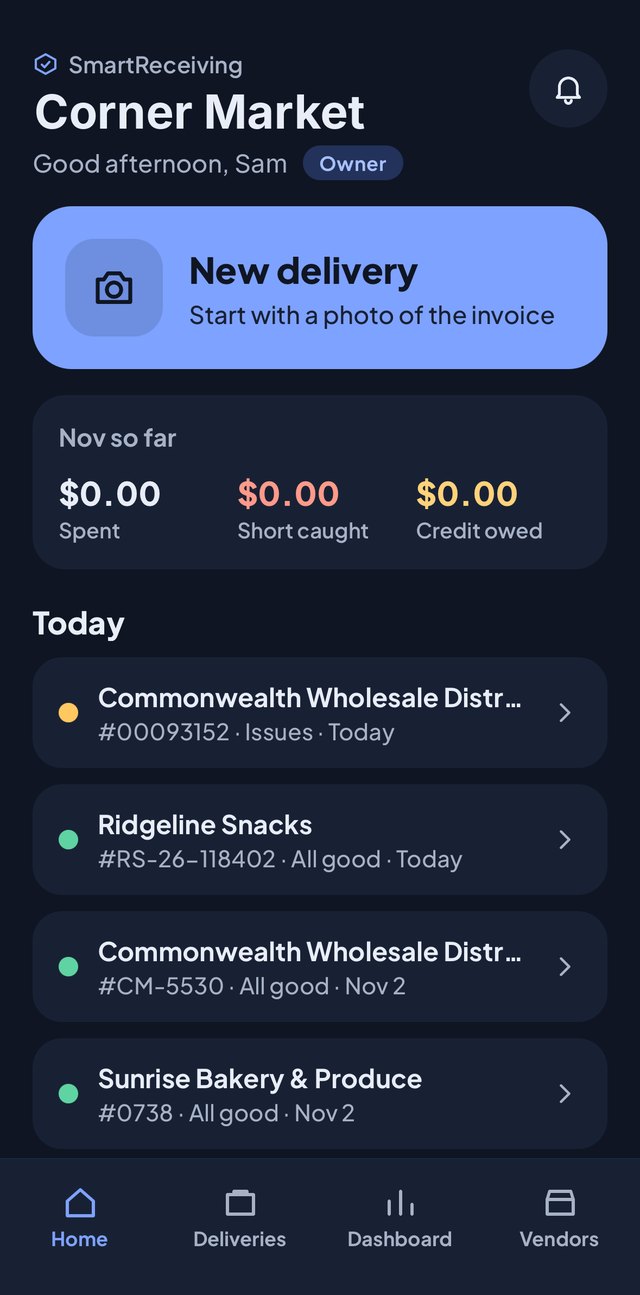 12345
- 1Price alerts
The bell lights up when a vendor raises a price.
- 2Your account
Tap your role to open your account, team and billing.
- 3New delivery
Start here: take a photo of the invoice when the truck arrives.
- 4This month so far
What you've spent, the shorts you've caught, and credits still owed to you.
- 5Status at a glance
Green means all good. Yellow means something was short or needs a look.
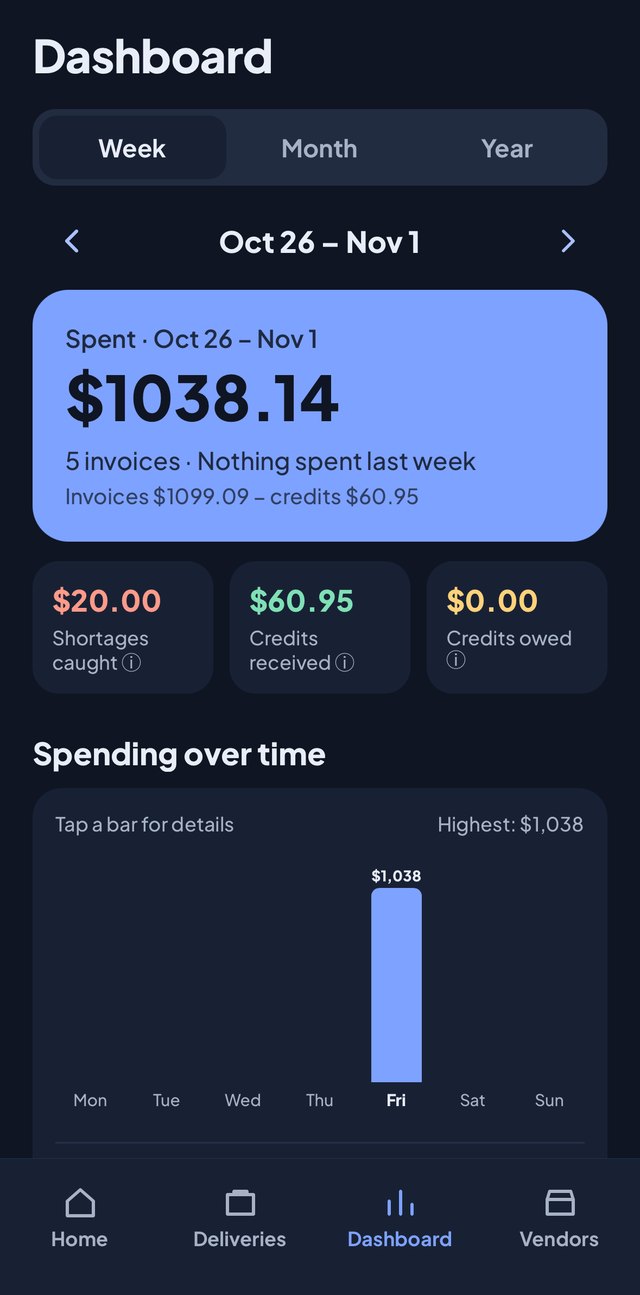 123456
- 1Week, month or year
Switch the view in one tap.
- 2Go back in time
Use the arrows to see earlier weeks, months or years.
- 3What you really spent
Invoice totals minus credits, so the number is honest.
- 4Shortages caught
The value of everything that didn't come off the truck.
- 5Credits owed
Money vendors still owe you, so nothing gets forgotten.
- 6Spending over time
Tap any bar to see the deliveries behind it.
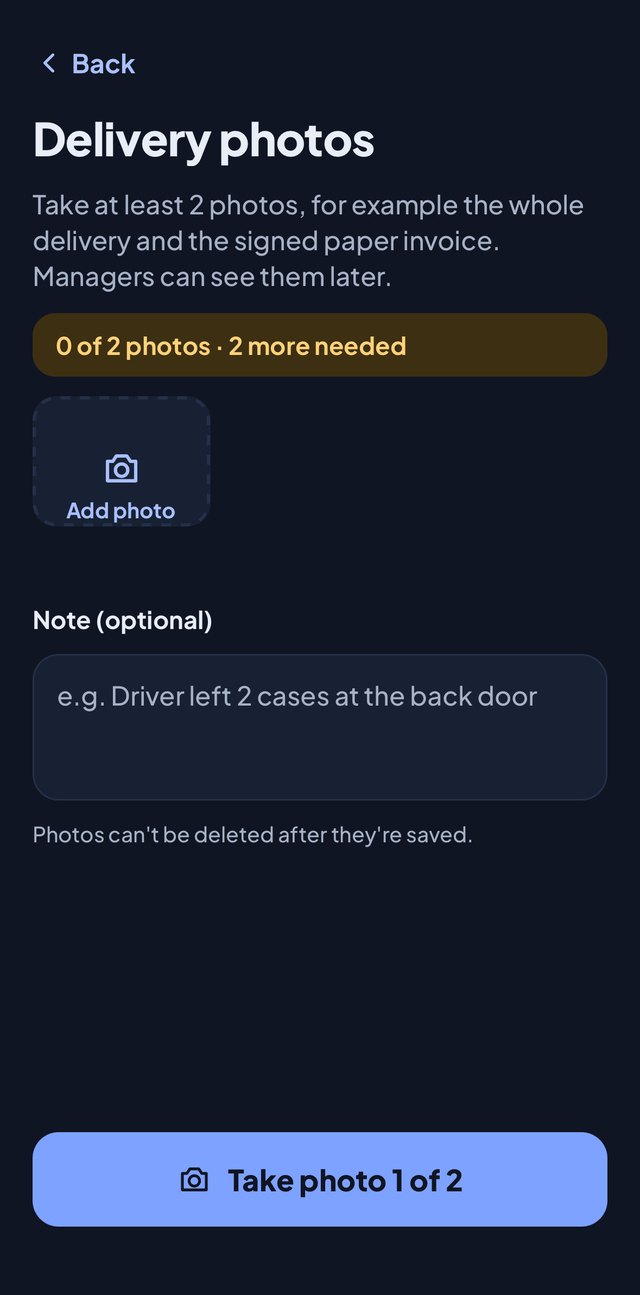 123
- 1Proof for every delivery
Two photos are needed before a delivery is finished, like the full delivery and the signed invoice.
- 2Add a note
Write down anything unusual, like "Driver left 2 cases at the back door".
- 3Photos are locked
Once saved, photos can't be deleted, so your proof is always there for a credit claim.
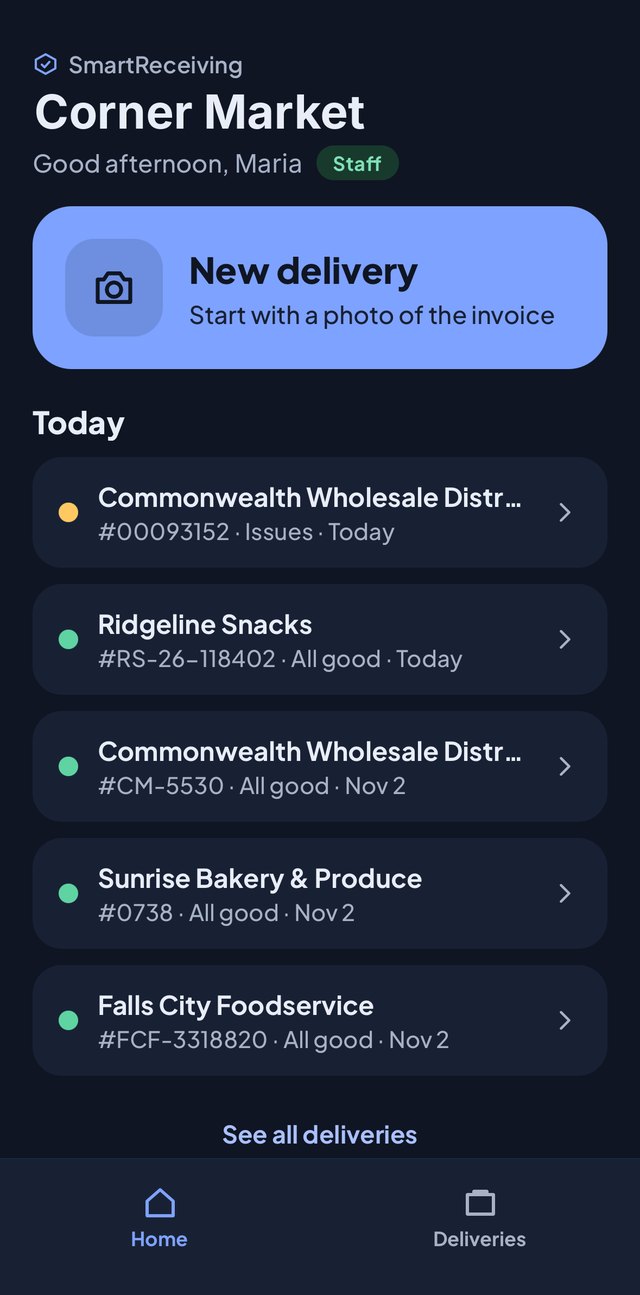 12
- 1Roles
Owner, Manager and Staff each see what fits their job.
- 2Simpler for staff
Staff get just Home and Deliveries: no spending numbers, no billing.
Who it's for
For any business that receives deliveries
Convenience stores, grocery stores, liquor stores, restaurants, cafés: if vendors drop off product with an invoice, SmartReceiving helps you check it.
Try it free for 14 days
Download the app, create your store, and check your next delivery.